
Wickly: an AI chart reader for crypto traders, right inside Chrome
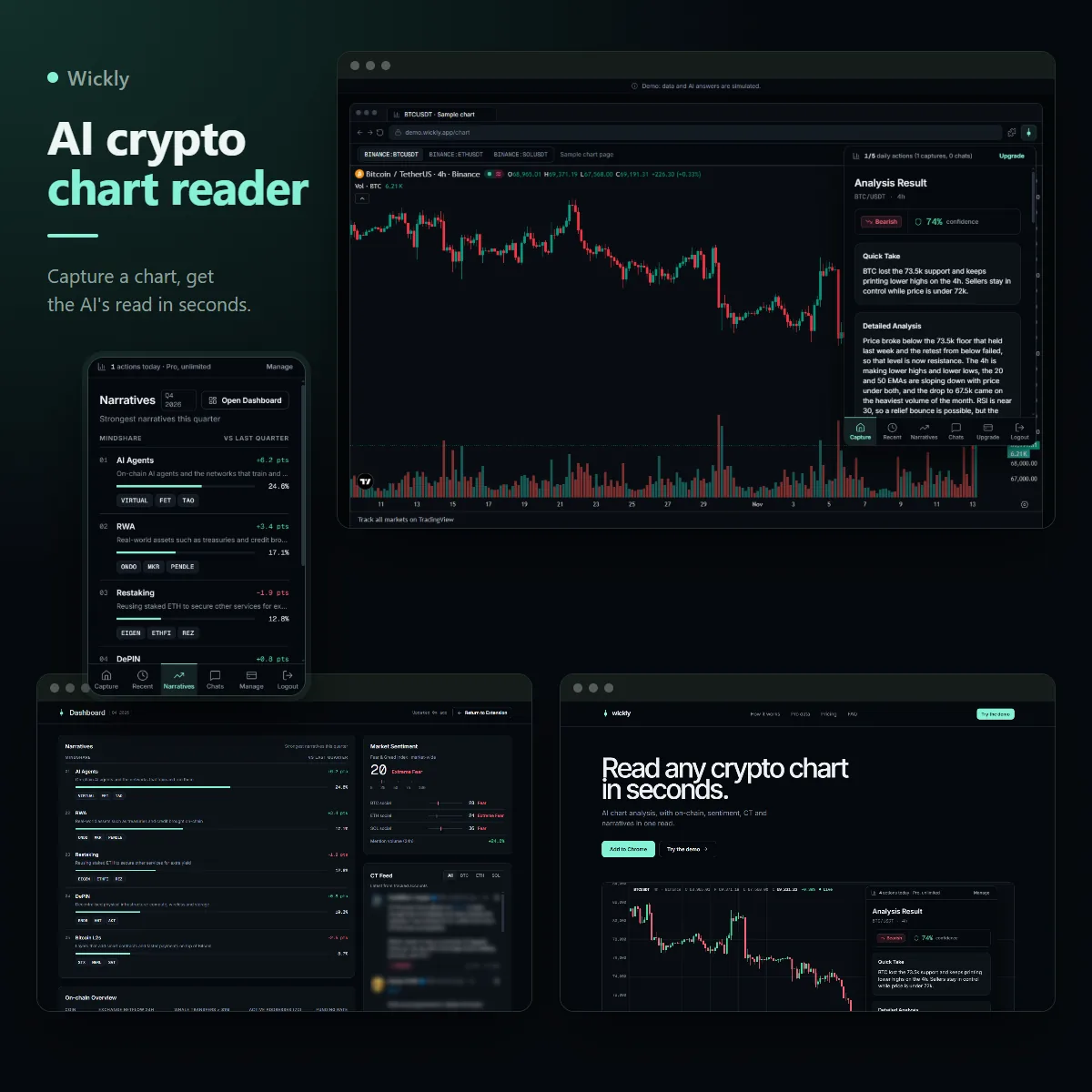
A trader looks at a chart and isn't sure what it's saying. Wickly sits in the browser toolbar. One click captures the chart, the whole tab or just the part you drag over, and a few seconds later the AI gives its read: bullish, bearish or neutral, how confident it is, why, and what to do next. Then you can ask it follow up questions. Pro adds what a chart can't show: on-chain flows, sentiment, what Crypto Twitter is saying, and the narratives leading the quarter.
Trading tools startup (Europe)
Engineer on the original extension, sole builder of the public rebuild
3 months
React, TypeScript, WXT (Chrome MV3), Firebase, Stripe, Claude, TradingView, Astro
Demo login: demo@wickly.app / wickly-demo. No install needed, the real extension popup runs next to a live chart in your browser.
First, a quick honest note
The original extension was built for a startup in Europe and its code stays private, so I won't name them or show their product. To show you how I work, I studied the original and rebuilt it from scratch under a new name, Wickly, running on sample data. You can try every screen yourself. The capture flow, the free and paid plans and the payment flow follow the original. The Pro data layers and the dashboard were added in the rebuild at the owner's request, built so real data providers can plug in later.
The problem
Traders already live on TradingView. When a chart looks unclear they want a second opinion, fast. Right now that means a screenshot pasted into a chatbot, then five more tabs for funding rates, whale flows, the Fear and Greed index and whatever Crypto Twitter is shouting about. By the time they've checked everything, the move is gone.
The founder wanted a tool that lives where traders already are, gives a clear read in seconds, and pays for itself: a free plan good enough to get people hooked, and a monthly Pro plan for the ones who use it every day.
What I built
-
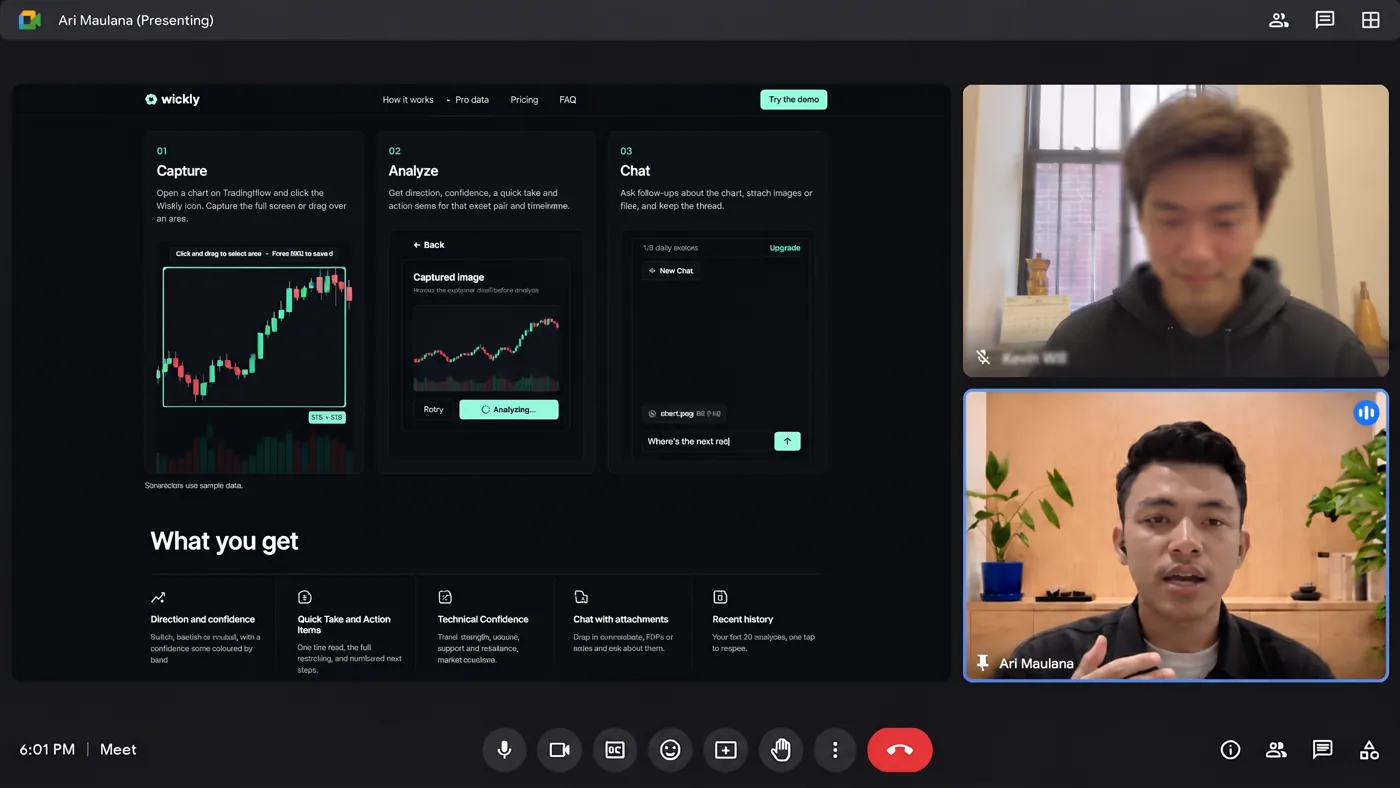
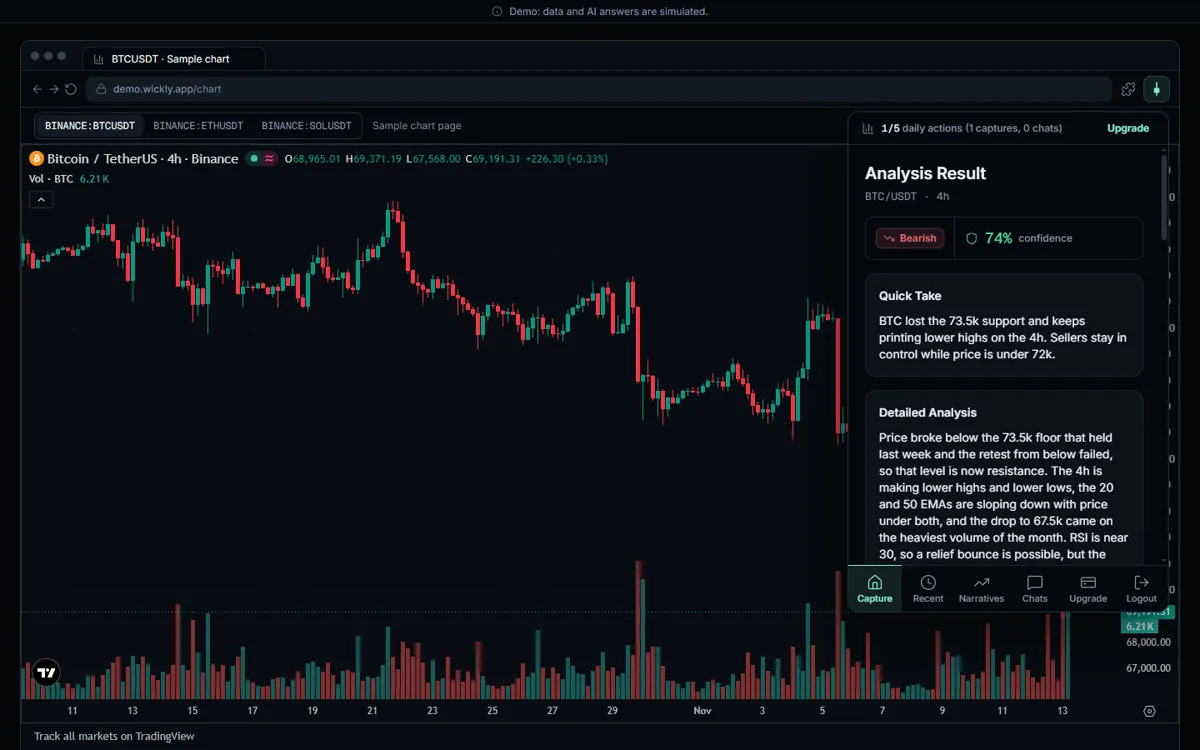
A Chrome extension that reads the chart you're looking at. Capture the whole tab or drag over just the chart. The AI returns a direction with a confidence score, a quick take, a detailed analysis, numbered action items, and a technical check on trend strength, volume, support and resistance and market structure. The pair and timeframe are read from the chart itself.
-
A chat for the follow up questions. Ask anything about the trade, and attach images, PDFs, JSON or text files up to 10 MB. Your last 20 analyses are one tap away, and a live BTC and SOL ticker sits on the home screen.
-
Free and Pro plans, with real billing. Free gets 5 actions a day, shared between analyses and chat. Pro is unlimited and paid monthly through Stripe, with a subscription page and clear success, cancelled and failed payment screens. Sign in with Google or email, and an onboarding that walks people from install to their first scan.
-
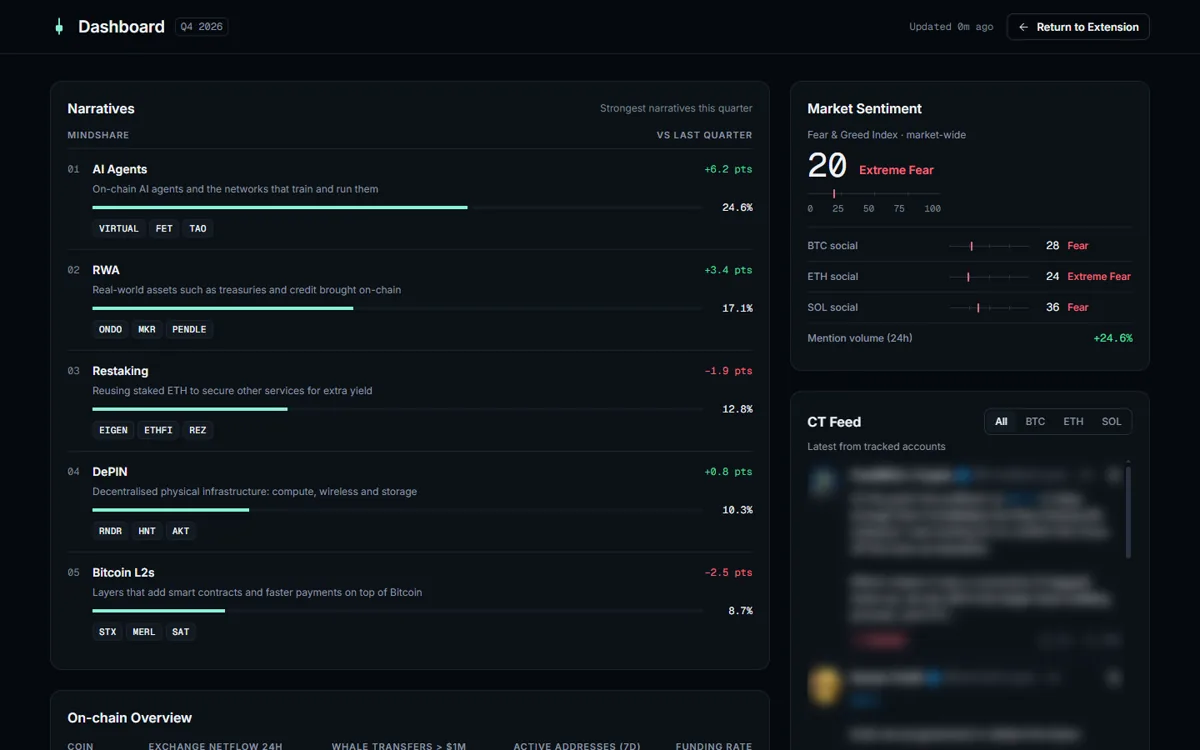
Pro data layers and a dashboard. Under the chart read, Pro users see exchange netflow, active addresses, whale transfers and funding, social sentiment with the Fear and Greed index, the latest posts from tracked Crypto Twitter accounts, and the quarter's top narratives with the tokens leading them. A desktop dashboard puts all of it in one view.
-
A web demo and a landing page. Asking someone to install an extension just to see it is a big ask. So the exact same popup also runs in a normal web page, next to a live TradingView chart. Anyone can try it from a link. The landing page sends visitors straight there.
The architecture
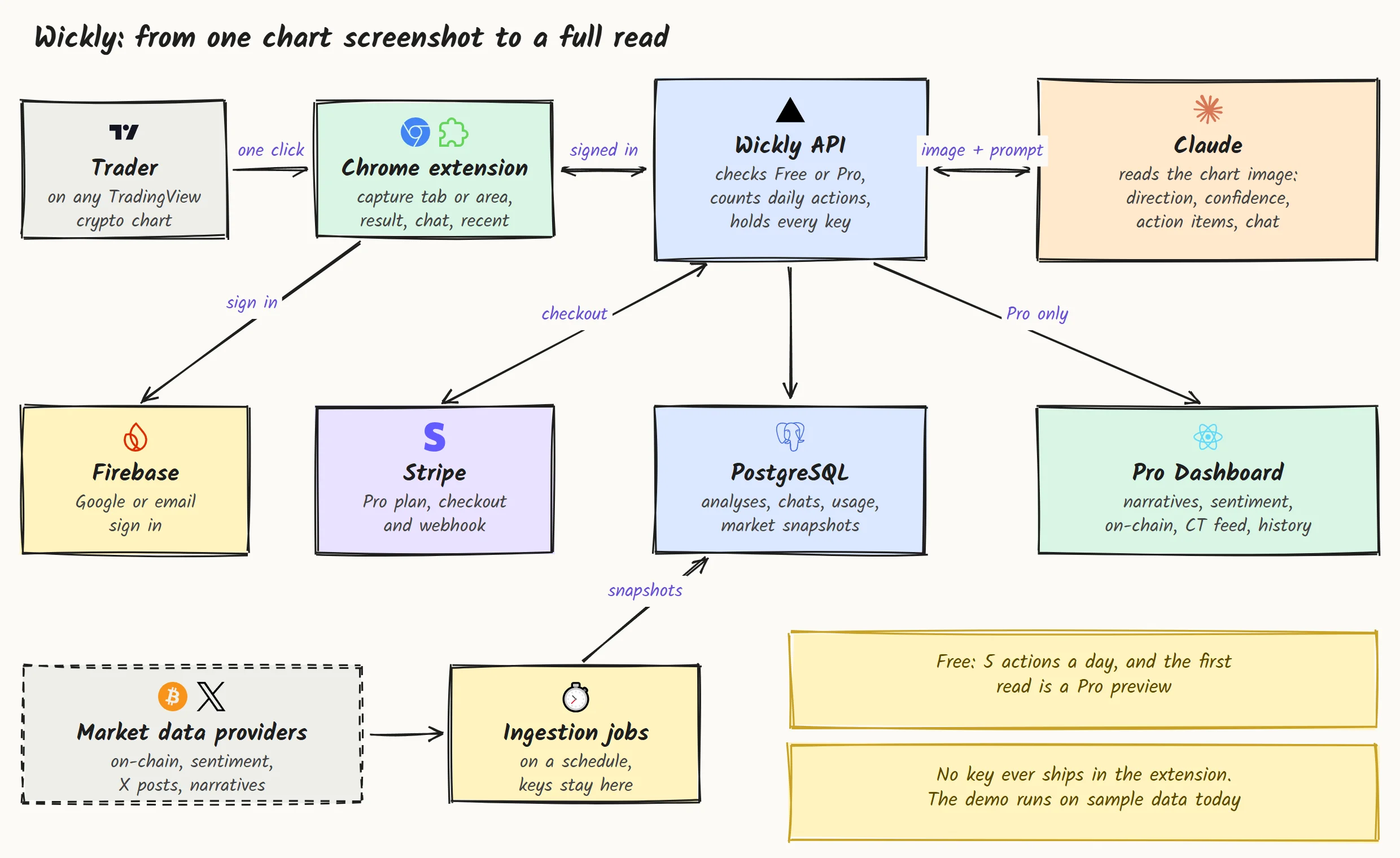
The trader only ever sees the extension. Behind it, one small API does the sensitive work: it checks whether you're Free or Pro, counts your daily actions, sends the chart to Claude, and talks to Stripe. Market data comes in on a schedule and is stored, so the number of paid data calls depends on the schedule, not on how many people use the app. The demo runs the same screens on sample data behind the same interfaces, so switching to real data is a setting, not a rewrite.
The hard parts, and how I solved them
A chart reader is easy to fake in a screenshot. Making it work inside the browser, on a real chart, and earn money without annoying people, is where the work is.
-
Capturing just the part of the chart that matters. Full screen captures pick up toolbars and noise. So there's an overlay you drag across the page, like a screenshot tool. It ignores accidental tiny boxes, Escape cancels it, and the popup gets out of the way during the capture and comes back already holding the cropped chart.
-
One product, two homes. The same screens had to run as a Chrome extension and as a normal web page for the demo. Everything browser specific, like capturing the tab, storage and opening new pages, goes through one small adapter. The extension uses Chrome's own capture; the demo uses the browser's screen capture and falls back to a sample chart if you say no. One codebase, so a fix lands in both at once.
-
Selling Pro without teasing people. Blurred fake numbers behind a paywall feel cheap. Instead, every new account's first analysis is a full Pro preview, so people see exactly what they'd pay for. After that, locked blocks say plainly what they hold and how to unlock them, and the Pro numbers aren't in the page at all. The 5 free actions are shared between analyses and chat, with a warning when two are left.
-
An extension can't keep a secret. Anyone can unzip a Chrome extension and read what's inside. So the extension holds no keys at all. The AI, the payments and every market data provider are called from the server, and the build only lets values marked public into the browser bundle.
-
Honest numbers in a hype heavy market. Crypto tools love rocket emoji and promises. Wickly doesn't. Every number says where it comes from, sample data is labelled as sample data, missing data says "no data" instead of guessing, and the landing page says clearly that it isn't financial advice. Calm design, numbers first.
How I write the code
-
One monorepo, three apps. pnpm and Turborepo with the extension, the web demo and the landing page on top of shared packages for the screens, the design tokens, the domain types and the sample data. Change a screen once, the extension and the demo both get it.
-
Ready for real data from day one. Every data source sits behind a typed interface, and one setting decides whether it runs on sample data or the real provider. Providers can be switched on one at a time.
-
The database designed before the code. Users, analyses, chats, daily usage, subscriptions and the market snapshots each have a written schema with seed data, and the sample data follows it exactly.
-
Clean history. 309 small commits in Conventional Commits style, strict TypeScript, ESLint and Prettier on every app.
The process, step by step
Same method I use everywhere: ATM, short for Amati, Tiru, Modifikasi in Indonesian. Observe, imitate, then modify.
-
1
Observe. I read the original extension and its server screen by screen and wrote a full analysis: every flow, every state, every plan. I skipped the .env files on purpose. No secrets were read or copied.
-
2
Decisions in writing. Brand, scope, pricing, what's copied and what's new: 21 owner decisions recorded before a line of code, so nobody argues later about what was agreed.
-
3
Design and audit before code. 22 screens designed and audited for accessibility, with a design system built for numbers: one accent color, data set like instrument readouts, no emoji as icons.
-
4
AI agents build, I review and merge. Work is split into phases with owner gates. Several AI coding agents build in parallel, and nothing reaches main until I've checked it.
-
5
QA, then ship. The whole flow tested in a real browser, from sign in to payment to the dashboard, plus the extension on a real TradingView chart. Two defects found and fixed before the final deploy.
Security, and how I checked it
This tool touches people's money decisions and their card details, so trust is the product.
-
No secrets in the extension. The AI key, the Stripe keys and every data provider key live only on the server. Real values sit in the hosting provider's secret settings, and only the names are in the repo.
-
Paying is handled by Stripe. Card details never touch our code. Checkout and the subscription status go through Stripe's own pages and webhook.
-
Pro stays Pro. The plan is checked before the data reaches the screen, so a Free account can't dig the locked numbers out of the page. I checked this in QA.
-
The demo calls nobody it shouldn't. In QA every request from the demo went only to its own site and the TradingView chart. No trackers, no stray calls.
Fast, and usable by everyone
A trader opening the popup mid move has no patience for spinners.
-
The popup is ready when you are. It ships inside the extension, so there's no website to load before you can capture.
-
A landing page that keeps people. On a laptop it loads in about half a second and scores a perfect 100 on Google's own speed, accessibility, best practices and SEO checks. On a phone the speed score is still 96. Fewer people bounce before they reach the demo button.
-
Accessible by default. An automated accessibility check found zero issues on the six main screens, from sign in to the dashboard, and the demo and dashboard work on a phone too.
Delivery
The web demo and the landing page ship as separate Vercel projects, so a change to the landing can't break the demo. The extension builds to a folder you load into Chrome, or a zip you can share or upload to the Chrome Web Store.
You'd get the repo, the analysis, the plan with every decision, the database schema, the design system, the QA report and a kanban showing where everything stands. Enough for anyone to pick it up after me.
What you get when you work with me
-
Something you can click, early. A live demo link you can send to investors or users before the full product is done.
-
Every decision written down. Scope, pricing and features agreed in writing, and you sign off at each gate.
-
Built to grow. Sample data today, real providers tomorrow, without rebuilding the screens.
-
Your keys stay yours. Nothing secret ships to the browser, and you own every account and every key.
What the founder got in 3 months
3
Products shipped from one codebase: the extension, a web demo and the landing page
22
Screens designed and checked before a line of code
100
Google's speed score for the landing page
Years of
Experience
Projects
Delivered
Features
In Production
Community
Members
Get in touch
Have a product to build, or a workflow that eats your team's time? Tell me about it.I'll build a small working piece of it first, free, so you can judge the result before you commit.