
Askly: an anonymous AI helpdesk for HR questions
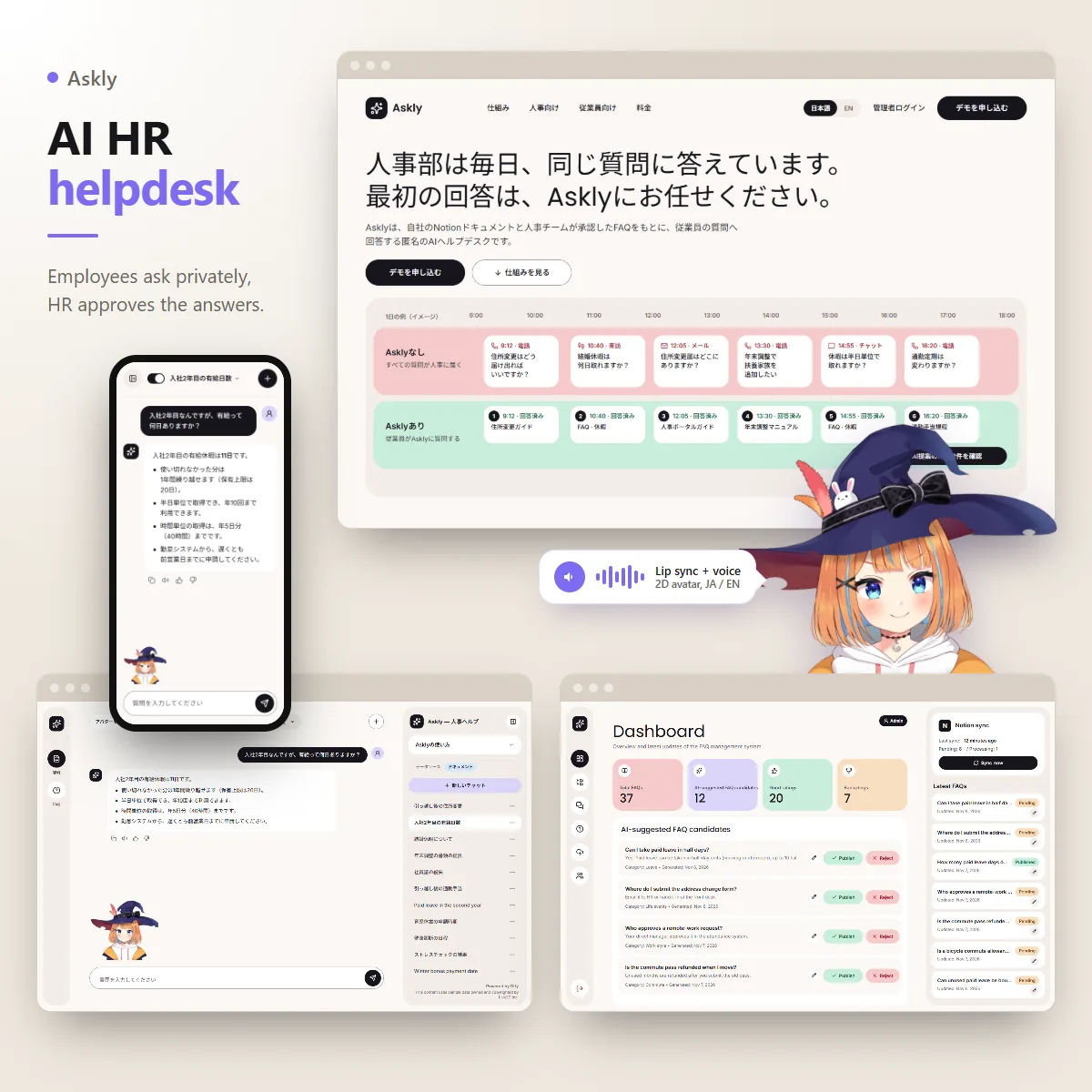
HR teams answer the same questions every single day. How many leave days do I get? Where's the address change form? Can I take leave in half days? Askly answers them first, from the company's own Notion pages and an FAQ that HR approves, and employees can ask without anyone knowing who asked. A 2D animated assistant answers with them, lip syncing every reply and reading it out loud when asked.
HR team of a client company (Kyoto, Japan)
Engineer on the original platform, sole builder of the public rebuild
2 months
Next.js, Fastify, PostgreSQL, Qdrant, Dify, OpenAI, Notion API, Live2D, Web Speech API
Admin demo login: password / password. The chat needs no login, that's the point.
First, a quick honest note
The original platform was built for one client company and its code stays private, so I won't name them or show their data. To show you how I work, I studied the original and rebuilt all three apps from scratch under a new name, Askly, running on fictional data. You can open every screen yourself. The AI pipeline, the security and the infrastructure below describe the original. The screens are the rebuild.
The problem
The company kept all its HR rules in Notion: moving house, getting married, tax adjustments, commute passes, and the paperwork that goes with each one. Nobody reads Notion, though. People just phoned HR.
That caused three problems. The phone tied up both sides. Forms and documents are hard to explain by voice. And the big one: it wasn't anonymous. Nobody wants HR or their boss to know they asked about marriage leave, living together, or harassment. The client had already tried Notion AI and dropped it because the answers weren't accurate enough.
So the brief came down to five things. Answer from Notion. Include files attached in Notion. Handle a big workspace. Let people ask anonymously. And be more accurate than Notion AI.
What I built
-
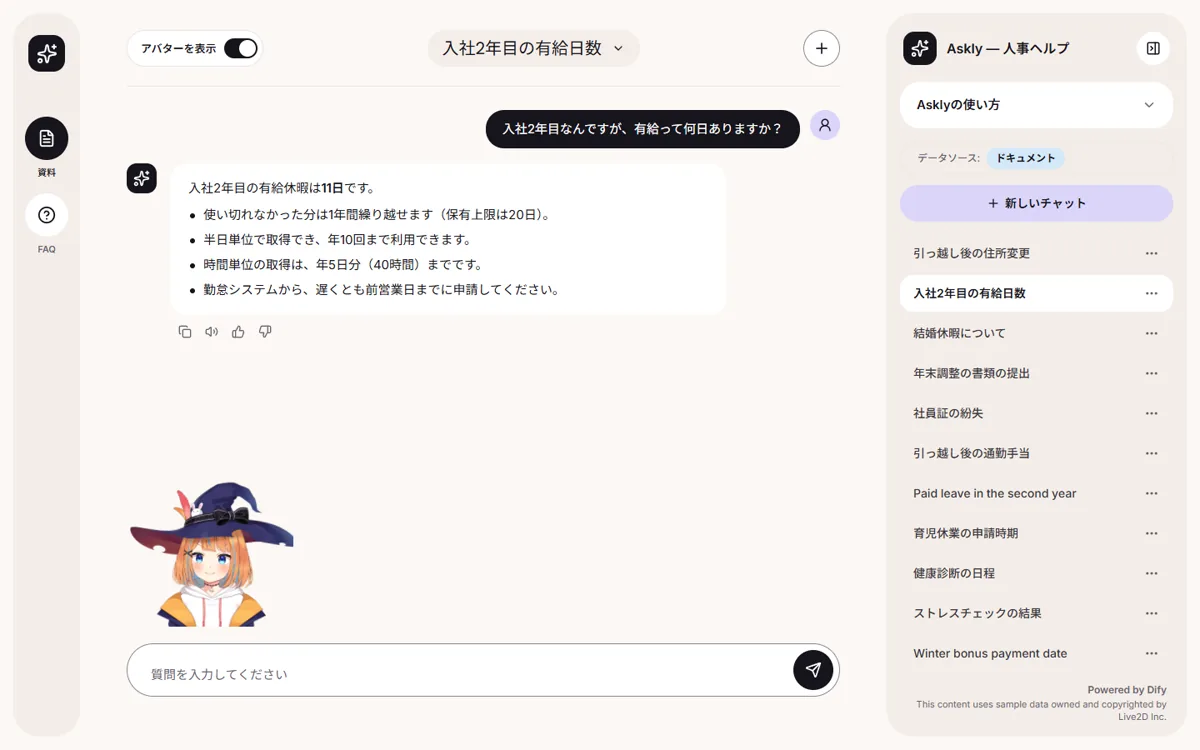
A chat that feels like ChatGPT, with no login. Employees open it from a desktop shortcut or by scanning a QR code on the office wall, so it's designed for the phone first. They pick a source, company documents or the approved FAQ, and the answer streams in word by word, in Japanese or English. They can stop it, rate it, rename or delete the conversation.
-
A 2D animated assistant with lip sync and a voice. A Live2D character sits beside the chat, moves her mouth in time with each answer, shows a mood, and reads the answer out loud with text to speech when someone presses play. More on her below.
-
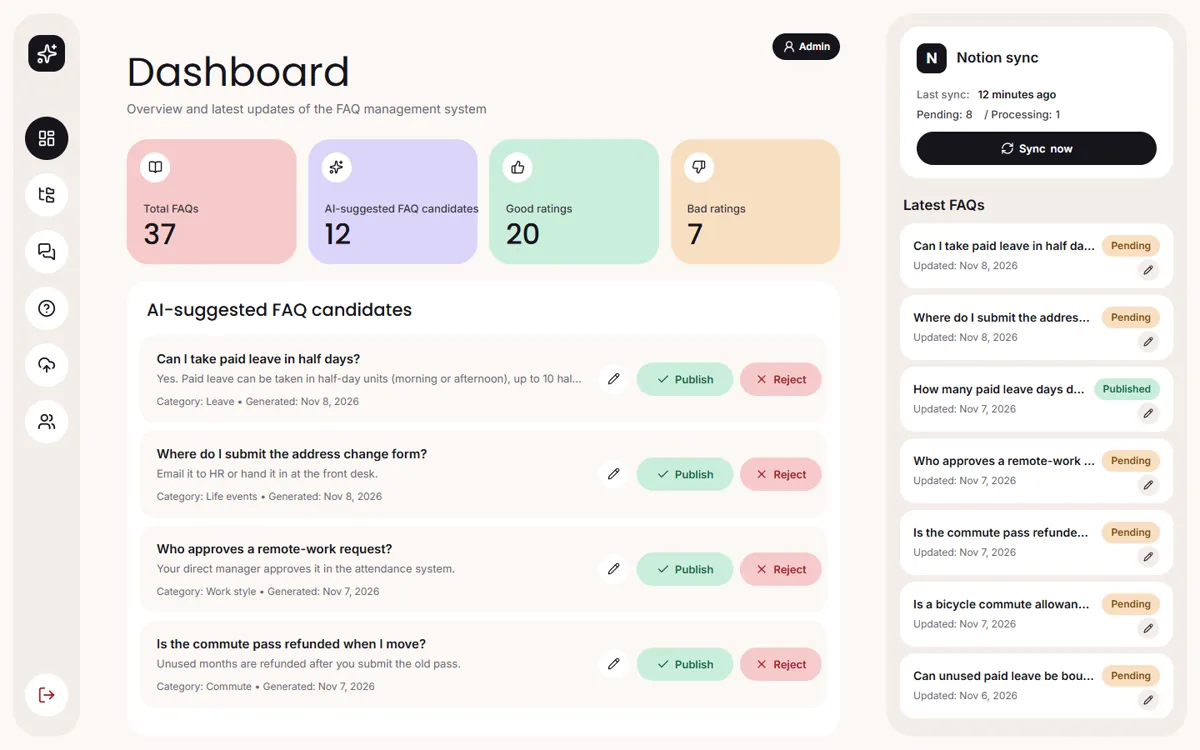
An admin panel HR can actually use. Dashboard with good and bad ratings, a Notion sync card, FAQ management with nested categories, conversation logs with the rating of every turn, admin accounts, and file upload with progress you can cancel.
The animated assistant: a 2D character that talks back
A plain text box can feel cold, especially when the question is personal. So the chat has a small 2D anime style character next to the answers. She reacts while the answer comes in, moves her mouth with the words, and can read the answer out loud. It makes the tool feel friendly, and a friendly tool is one people actually open instead of calling HR.
-
Lip sync that follows the answer. As the answer streams in, every letter becomes a mouth shape: a, i, u, e, o, and closed on spaces and punctuation. Japanese works too. Each kana maps to its vowel, and kanji keep the mouth moving, so she looks right in both languages.
-
Text to speech, only when you ask. Every answer has a play button. She reads it out loud while her mouth follows the spoken words, then stops when you press it again. She never talks on her own, which matters in a quiet office. The voice is the browser's own text to speech, so there is no cost per answer and no extra server. It picks the most natural Japanese or English voice the device has: Microsoft's natural voices on Edge, Google's on Chrome, Apple's on an iPhone.
-
She shows how the answer feels. Four moods, neutral, positive, negative and alert, arrive with the first words of each answer. While the AI is still thinking she strikes a thinking pose. In between she blinks, breathes and her hair moves, the way a VTuber model does.
-
She stays out of the way. A switch in the header hides her, and the chat remembers the choice. People who have reduced motion turned on start with her hidden. On a new chat she waves next to the title instead of covering the how to cards. And she only loads when she's shown, so the chat stays quick for anyone who turns her off.
-
Easy to make yours. The character in the demo is Live2D's official sample model, credited in the chat. For your company I'd swap in your own mascot, since one config file names the model, its faces and its mouth. The voice sits behind a small interface too, so moving to a premium cloud voice like OpenAI or ElevenLabs later doesn't touch the screens.
The architecture
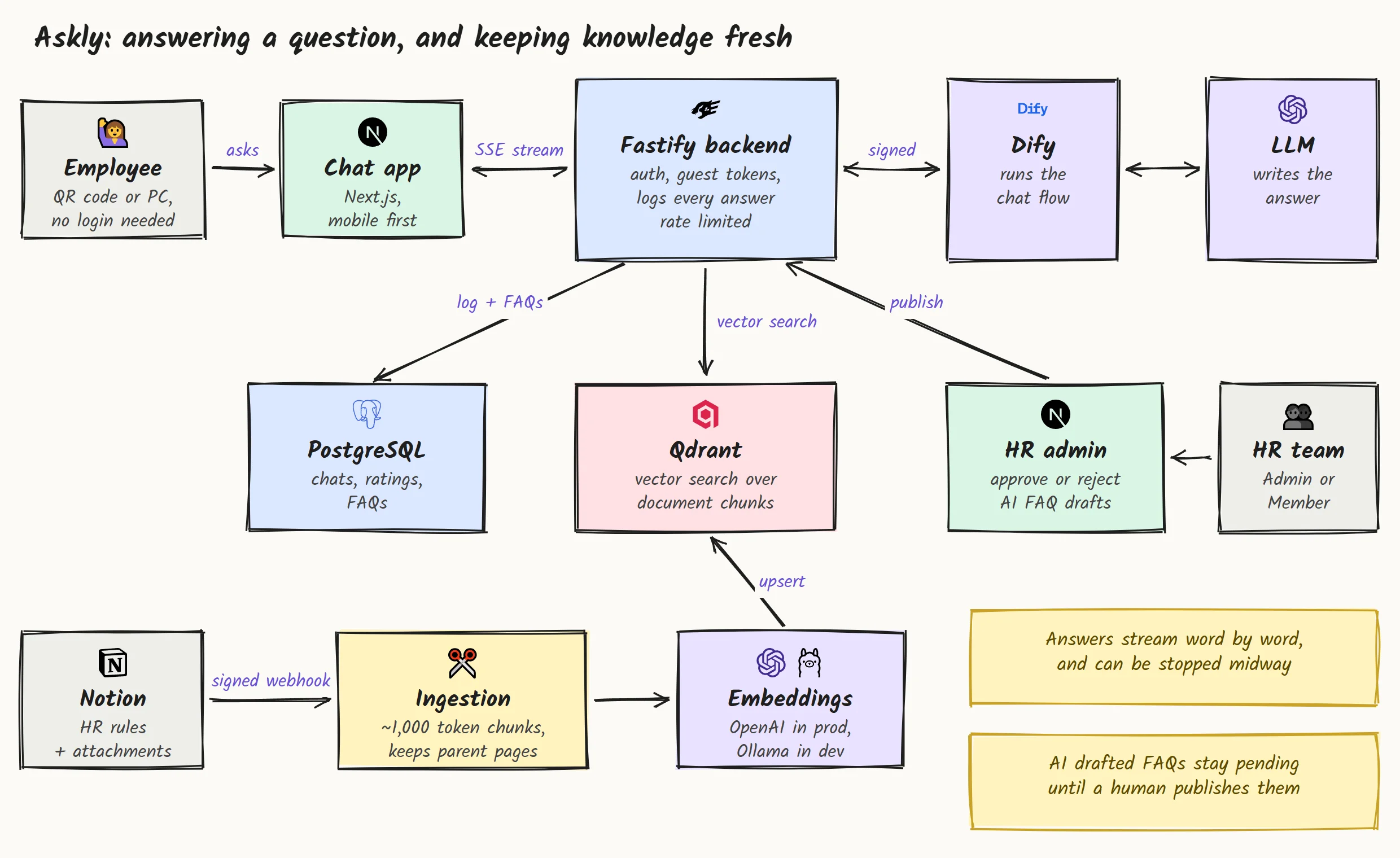
Two flows run side by side. On top, an employee asks a question: the chat streams it to our Fastify backend, Dify runs the conversation and calls back into the backend to search Qdrant, and the LLM writes the answer from what it found. At the bottom, knowledge stays fresh: Notion pages flow through ingestion and embeddings into the same vector store. HR sits on the right, approving what the AI suggests.
The hard parts, and how I solved them
An HR chatbot is easy to demo and hard to trust. These are the problems that made it worth building properly.
-
Beating Notion AI on accuracy. The client had already tried Notion AI and given up on it, so "good enough" wasn't good enough. Pages and their attachments are split into chunks of about 1,000 tokens, and every chunk remembers the pages above it. A chunk about year two leave still knows it lives under Leave, then Paid leave. That context is what keeps answers specific instead of vague. Employees can also switch to the FAQ source, where every answer was approved by HR.
-
Anonymous has to mean anonymous. People only ask about marriage leave or harassment if they trust nobody will know. So there is no login at all on the chat. Each visitor gets a guest token, and nothing ties a question to a name.
-
Knowledge goes stale the day HR edits a page. A signed Notion webhook catches new, edited, moved and deleted pages and re-indexes them. For teams that want control over timing, there's a manual mode: changes queue up and HR clicks "Sync now" on the dashboard.
-
An AI shouldn't write HR policy on its own. HR can upload PDFs, Word files, spreadsheets or a ZIP, and an LLM pulls question and answer pairs out of them. A scheduled job also proposes new FAQs from real conversations. None of it goes live by itself. Every draft waits as pending until someone on the HR team publishes or rejects it.
-
Typing in Japanese. When you type Japanese, Enter confirms the characters you picked. A normal chat box treats that same Enter as send, so every Japanese user ends up sending half a sentence. The chat tells the two apart, so Enter only sends when you're actually done.
-
Making her talk the same way on every phone. Every browser does speech a little differently. An iPhone only allows a voice that starts from a tap, so the first sentence starts right inside the click. Chrome sometimes drops speech after a stop, or never says it has finished, so a watchdog keeps things moving. Some voices don't report which word they're on, so the mouth falls back to a natural speaking pace. And long answers are read sentence by sentence, because some browsers cut long speech off halfway.
How I write the code
-
One monorepo, shared building blocks. pnpm and Turborepo with three Next.js apps on top of a shared UI package of 23 components, a shared config, and a typed mock layer. Change a button once, all three apps get it.
-
Tests where the logic is. 47 Vitest cases cover the parts that would hurt if they broke: auth, roles, chat, streaming and the data store.
-
Limits with clear messages. Messages are capped at 10,000 characters and uploads at 5 MB, and each limit tells you plainly what happened instead of failing silently.
-
Clean history. 240 commits in Conventional Commits style, 17 feature branches merged without squashing, so you can trace any line back to the task it came from.
The process, step by step
Same method I use everywhere: ATM, short for Amati, Tiru, Modifikasi in Indonesian. Observe, imitate, then modify.
-
1
Observe. I read the original, app by app, and wrote a full analysis: the business problem, the architecture, the data model, every screen. I skipped the .env files on purpose. No secrets were read or copied.
-
2
Design and audit before code. 23 frames designed and then audited. The audit caught input borders with a contrast of 1.26 to 1, basically invisible. I fixed them to 3.45 to 1 before a single component was built.
-
3
A kanban of 20 tasks with owner gates. Each task has a branch and a definition of done. At two milestones the work stops until the owner signs off. That's where you would come in as the founder.
-
4
AI agents build, I review and merge. Several AI coding agents work in parallel, each in its own git worktree. They're not allowed to push. Nothing reaches main until I've checked it.
-
5
Visual QA, then ship. A final pass compares every screen against the design on desktop and mobile, then all three apps go live.
Security, and how I checked it
An HR bot sits on top of company rules and very personal questions. Anonymity is only worth something if it's built into the system, not just promised on the landing page. In the original:
-
Anonymous by design. Employees chat with a guest token, not an account. There's no login tying a question to a name.
-
Only Notion can trigger a sync. Every webhook has its signature verified, and the internal routes Dify calls back into are protected with HMAC signed URLs.
-
Roles enforced on the server. Admin passwords are hashed with Argon2, sessions use JWT cookies, and every route that changes data checks for the admin role. A member can look, not touch.
-
Hardened at the edge. Security headers, rate limiting and CORS on the API, behind a load balancer with a web application firewall.
In the rebuild I mirrored the same rules so you can see them working: the member role gets a 403 on anything that changes data and sees forms as read only, inactive accounts can't log in, every form is validated with Zod, the developer playground returns 404 in production, and the switch I use to simulate errors is ignored in production builds. Those role rules are covered by tests, not just clicked through once.
Fast where employees feel it
Someone scanning a QR code between meetings gives a tool a few seconds. If it feels slow, they pick up the phone and call HR again.
-
Answers start appearing right away. The reply shows up word by word while the AI is still writing, so nobody stares at a spinner. A long answer can be stopped halfway.
-
Quick to open. On a work laptop the chat's first screen shows up in about a second, and nothing jumps around while it loads. Anyone who would rather skip the animated assistant can switch her off, and the chat remembers.
-
Stays up on a busy morning. When everyone asks about the new leave policy at once, the server slows down gracefully instead of falling over.
-
Keeps the AI bill low. During development the AI search runs on a free local model, so no money is burned on testing. Production switches to OpenAI automatically.
Delivery
The original runs in Docker on AWS behind a load balancer and firewall, all set up with Terraform so the environment can be recreated from code. GitHub Actions builds the apps, runs the backend tests, and runs automated code review and security scan workflows on top of that.
The rebuild ships as three separate Vercel projects, landing, chat and admin, each deployed from main. Separate projects mean a fix to the admin can't break the chat employees are using. You'd get the repo, the analysis, the implementation plan, the kanban and the audit reports. Enough for anyone to pick it up after me.
What you get when you work with me
-
A working piece before you commit. I build a small part of your idea first, running for real. You decide after you've used it.
-
You sign off at every milestone. No surprise at the end. The work stops at agreed gates until you've seen it and said yes.
-
AI with a human in the loop. When an AI writes something your users will rely on, a person approves it first. That's how Askly works, and that's how I'd build yours.
-
Fast, and checked. Every screen is tested on desktop and on a phone, and the core logic is covered by automated tests.
What the HR team gets
24/7
Answers for employees, without a call to HR
0
Logins needed, so asking stays anonymous
100%
Of AI written FAQs checked by HR before going live
Years of
Experience
Projects
Delivered
Features
In Production
Community
Members
Get in touch
Have a product to build, or a workflow that eats your team's time? Tell me about it.I'll build a small working piece of it first, free, so you can judge the result before you commit.